
signup
Enter your email address and receive all updates!
HP 300 Ink
HP 300 Ink Comparison
| HP Original 300 Ink (XL) | IJT Recycled 300 Ink (XL) | |
| Warranty | 6-12 Months | 5 Years |
| Price | from £47.50 | from £14.95 |
| Longevity | Up to 18 Months | Up to 5 Years |
| Yield | 600 Pages (Black), 440 Pages (Tri-Colour) | 600 Pages (Black), 440 Pages (Tri-Colour) |

HP INK CARTRIDGE WARRANTY - HP Original ink cartridges are supplied with a 12 month warranty while IJT Recycled HP 300 ink cartridges are supplied with an industry leading 5 Year Warranty

FAST UK DELIVERY. NEXT DAY COURIER DELIVERY AVAILABLE - All orders of HP 300 ink cartridges are shipped same working day if placed before 3pm

LOWEST PRICES - IJT have the best quality HP 300 ink and the lowest prices in the UK. Save money on HP OEM ink

RECYCLE YOUR HP 301 INK - Visit our Recycling Page for more information. Do your bit to save the planet and buy IJT Recycled ink
HP 301 Ink Product Overview

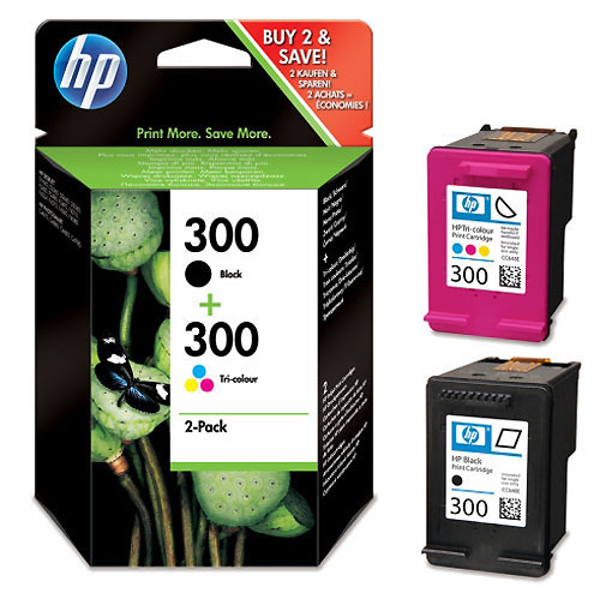
The HP 300 ink cartridges are designed for consistent, high-quality printing results. Compatible with a wide range of HP printers, they are perfect for everyday printing tasks. The black HP 300 ink cartridge delivers sharp, clear text, making it ideal for document printing. The tri-colour cartridge produces rich, vibrant colours, perfect for printing images.
These cartridges are known for their longevity and efficient ink usage, offering a cost-effective solution for both personal and professional printing needs. The HP 300 ink cartridges come in 2 yield sizes for larger savings and more efficiency. Users can effortlessly replace HP 300 ink cartridges thanks to the simple and straightforward process, which involves minimal steps and no need for technical expertise.
HP 300 Ink Printing Tips and Tricks
For the best results with HP 300 ink cartridges, it is recommended to use:
Paper Quality: High-quality, heavyweight paper for images and important documents. Standard printer paper is suitable for everyday text documents.
Printer Settings: Adjust to 'High Quality' mode for detailed prints and 'Draft' or 'Standard' for regular documents to optimise HP 300 ink usage.
Cartridge Care: Store spare HP 300 ink cartridges in a cool, dry place and ensure they are used before their expiration date.
Regular Use: Regularly use your printer to keep the ink flowing and prevent the nozzles from drying out.
HP 300 Frequently Asked Questions
How do I correctly install a HP 300 ink cartridge?
Turn on your HP printer, open the cartridge access door, and wait for the carriage to stop moving. Remove the new HP 300 ink cartridge from its packaging, pull the tab to remove the protective tape, and insert the cartridge into its slot until it clicks into place.
What are the steps to troubleshoot print quality issues with HP 301 ink?
Run the printer's cleaning cycle if prints are streaky or faded. Ensure all 300 cartridges are properly installed and not depleted. If issues persist, consider replacing the HP 300 ink cartridge.
Which HP printer models are compatible with HP 300 ink cartridges?
HP 300 ink cartridges are compatible with the following printers:
HP Photosmart C4600 Printer
HP Deskjet D2545 Printer
HP Deskjet D2530 Printer
HP Deskjet D1600 Printer
HP Photosmart D110B Printer
HP Photosmart D110A Printer
HP Deskjet F4500 Printer
HP Deskjet F4224 Printer
HP Photosmart C4799 Printer
HP Photosmart C4798 Printer
HP Envy 120 e-All-in-One Printer
HP Envy 110 e-All-in-One Printer
HP Deskjet F4580 Printer
HP Photosmart C4795 Printer
HP Photosmart C4793 Printer
HP Photosmart C4788 Printer
HP Photosmart C4785 Printer
HP Photosmart C4783 Printer
HP Photosmart C4780 Printer
HP Photosmart C4760 Printer
HP Photosmart C4740 Printer
HP Photosmart C4690 Printer
HP Photosmart C4688 Printer
HP Photosmart C4685 Printer
HP Photosmart C4683 Printer
HP Photosmart C4680 Printer
HP Photosmart C4673 Printer
HP Photosmart C4670 Printer
HP Photosmart C4650 Printer
HP Photosmart C4640 Printer
HP Photosmart C4635 Printer
HP Photosmart C4610 Printer
HP Deskjet F4583 Printer
HP Deskjet F4580 Printer
HP Deskjet F4492 Printer
HP Deskjet F4488 Printer
HP Deskjet F4483 Printer
HP Deskjet F4480 Printer
HP Deskjet F4473 Printer
HP Deskjet F4472 Printer
HP Deskjet F4470 Printer
HP Deskjet F4450 Printer
HP Deskjet F4440 Printer
HP Deskjet F4435 Printer
HP Deskjet F4424 Printer
HP Deskjet F4400 Printer
HP Deskjet F4294 Printer
HP Deskjet F4293 Printer
HP Deskjet F4292 Printer
HP Deskjet F4290 Printer
HP Deskjet F4288 Printer
HP Deskjet F4283 Printer
HP Deskjet F4275 Printer
HP Deskjet F4274 Printer
HP Deskjet F4273 Printer
HP Deskjet F4272 Printer
HP Deskjet F4250 Printer
HP Deskjet F4240 Printer
HP Deskjet F4235 Printer
HP Deskjet F4213 Printer
HP Deskjet F4210 Printer
HP Deskjet F2493 Printer
HP Deskjet F2492 Printer
HP Deskjet F2488 Printer
HP Deskjet F2483 Printer
HP Deskjet F2480 Printer
HP Deskjet F2476 Printer
HP Deskjet F2440 Printer
HP Deskjet F2430 Printer
HP Deskjet F2423 Printer
HP Deskjet F2420 Printer
HP Deskjet F2418 Printer
HP Deskjet F2410 Printer
HP Deskjet F2400 Printer
HP Deskjet D5568 Printer
HP Deskjet D5583 Printer
HP Deskjet D5560 Printer
HP Deskjet D2680 Printer
HP Deskjet D2668 Printer
HP Deskjet D2663 Printer
HP Deskjet D2660 Printer
HP Deskjet D2645 Printer
HP Deskjet D2600 Printer
HP Deskjet D2566 Printer
HP Deskjet D2563 Printer
HP Deskjet D1663 Printer
HP Deskjet D1660 Printer
HP Envy 100 e-All-in-one Printer
HP Envy 114 e-All-in-One Printer
HP Deskjet F4280 Printer
HP Deskjet F4200 Printer
HP Deskjet D2560 Printer
HP Deskjet D2500 Printer
What should I do with my empty HP 300 ink cartridges?
Don't throw away your empty cartridges, save them from landfill and help save the environment by recycling them. Our Recycled page has loads of useful info on how to responsibly dispose of your used HP 300 ink.
How can I extend the life of my HP 300 ink cartridge?
Use print settings wisely; 'Draft' mode for less important documents saves ink. Store unused cartridges properly and use them before the expiration date.
How can I distinguish between HP 300 Black and Tri-Colour ink cartridges?
The black HP 300 ink cartridge is used for printing black and white documents and is physically black in colour, while the tri-colour cartridge combines cyan, magenta, and yellow for colour printing and is physically purple in colour.
What should I do if my printer doesn't recognise the HP 300 cartridge?
Remove the cartridge, check for any protective tape left, and clean the contact points gently with a lint-free cloth before reinserting.
How do I check the ink levels of my HP 300 ink cartridges?
Check ink levels through your printer’s control panel or software. Some printers also display ink levels on the computer when a print job is initiated.
What our customers are saying
View all ›Applied: