
signup
Enter your email address and receive all updates!
HP 305 Ink
HP 305 ink cartridges offer both depending and affordable printing solutions for home and small office printing needs. They are designed for a range of HP DeskJet and HP Envy printers that deliver crisp text and vivid colour prints. Whether you're printing homework, photos or other important documents, HP 305 ink delivers consisent quality and performance.
HP 305 Ink Comparison
| HP Original 305 Ink (XL) | IJT Recycled 305 Ink (XL) | |
| Warranty | 6-12 Months | 5 Years |
| Price | from £17.33 | from £14.95 |
| Longevity | Up to 18 Months | Up to 5 Years |
| Yield | 240 Pages (Black), 200 Pages (Tri-Colour) | 240 Pages (Black), 200 Pages (Tri-Colour) |

HP INK CARTRIDGE WARRANTY - HP Original ink cartridges are supplied with a 12 month warranty while IJT Recycled HP 305 ink cartridges are supplied with an industry leading 5 Year Warranty

FAST UK DELIVERY. NEXT DAY COURIER DELIVERY AVAILABLE - All orders of HP305 ink cartridges are shipped same working day if placed before 3pm

LOWEST PRICES - IJT have the best quality HP 305 ink and the lowest prices in the UK. Save money on HP OEM ink

RECYCLE YOUR HP 305 INK - Visit our Recycling Page for more information. Do your bit to save the planet and buy IJT Recycled ink
HP 305 Ink Product Overview

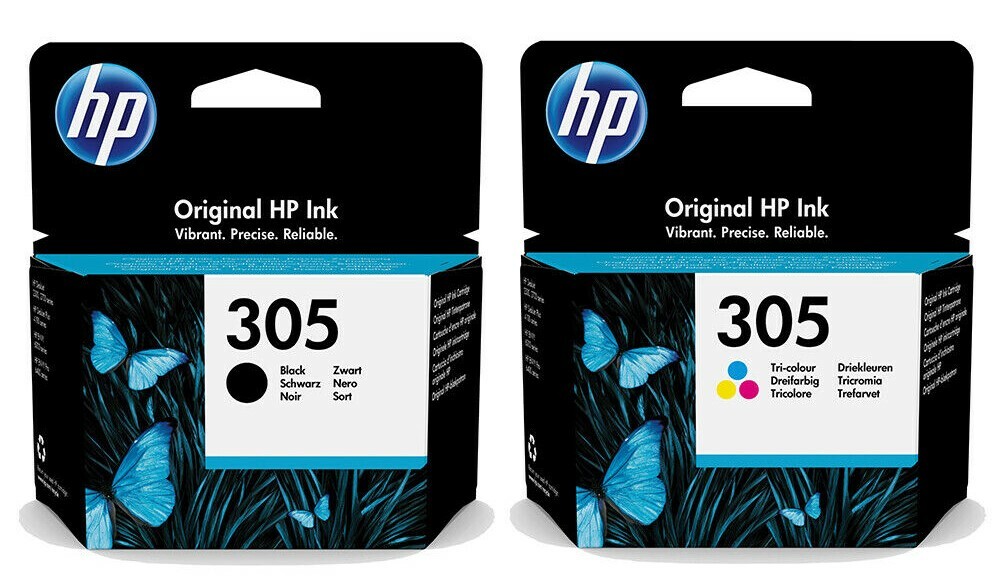
The HP 305 ink cartridges stand out for their ability to produce consistent, high-quality prints. They're compatible with a broad selection of HP printers, making them an ideal choice for everyday printing requirements. For crisp, clear text, the black HP 305 ink cartridge is your go-to, perfectly suited for all your document printing needs. When it comes to bringing images to life, the tri-colour cartridge delivers rich, vibrant colors that enhance any photo or graphic.
These cartridges are celebrated for their durability and efficient use of ink, providing a cost-effective printing option for both home and office settings. With two available yield sizes, the HP 305 ink cartridges offer greater savings and enhanced efficiency, catering to different printing volumes.
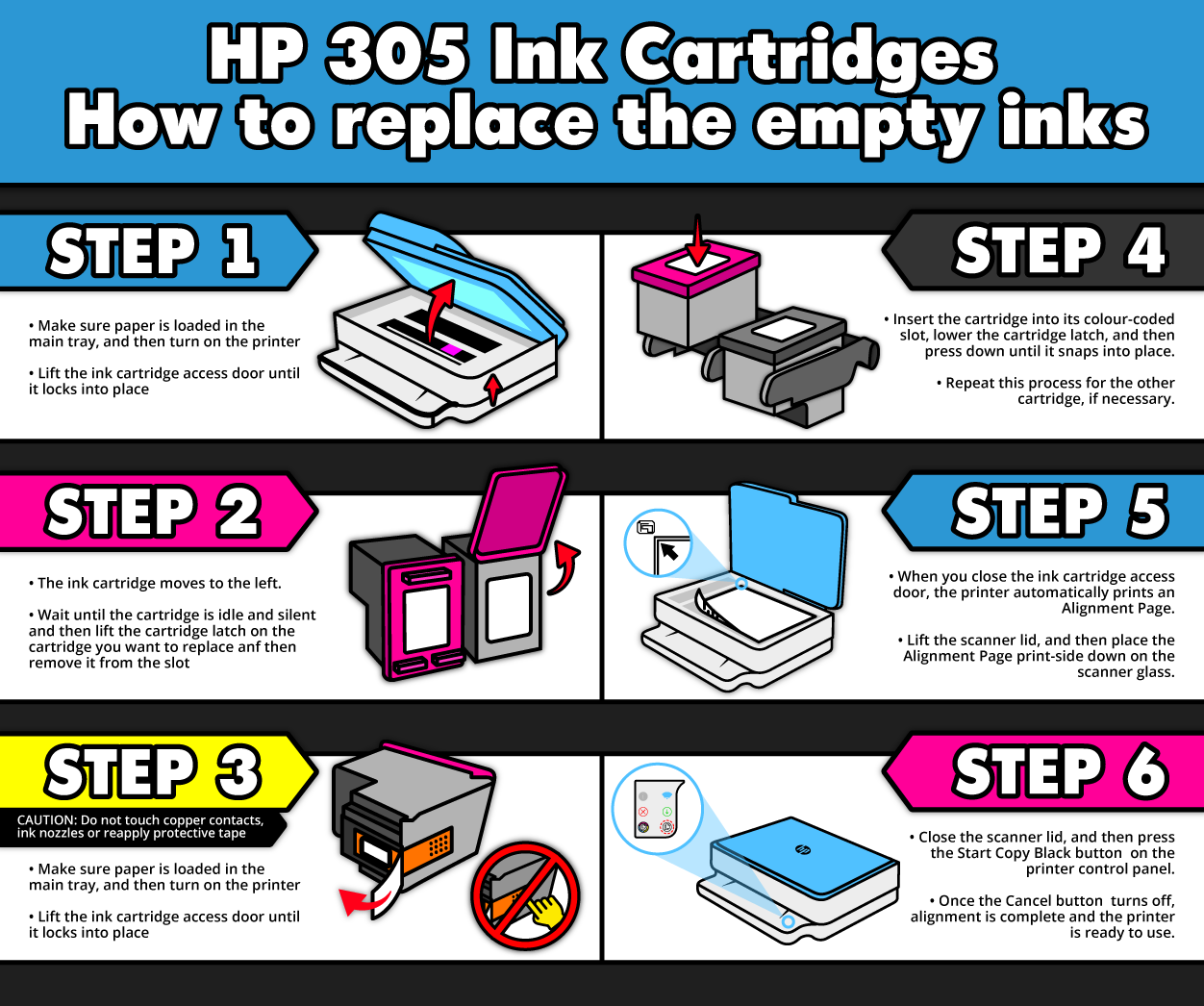
Replacing HP 305 ink cartridges is a breeze, thanks to a user-friendly process that requires just a few simple steps and no technical know-how. This ease of use ensures that maintaining your printer’s performance and output quality is straightforward and hassle-free, allowing you to continue producing outstanding prints without interruption.
HP 305 Ink Printing Tips and Tricks
For the best results with HP 305 ink cartridges, it is recommended to use:
Paper Quality: Use high-quality, heavyweight paper for printing images and significant documents to ensure superior print quality. Standard printer paper works well for everyday text documents.
Printer Settings: Optimise HP 305 ink usage by selecting 'High Quality' mode for intricate prints and 'Draft' or 'Standard' mode for routine documents. This adjustment helps manage ink consumption effectively.
Cartridge Care: Keep spare HP 305 ink cartridges in a cool, dry place, and use them before they expire to maintain print quality.
Regular Use: Maintain regular printer use to prevent ink from drying out and to keep the nozzles clear, ensuring consistent, high-quality output.
How to Replace Empty HP 305 Ink Cartridges
HP 305 Frequently Asked Questions
How do I correctly install a HP 305 ink cartridge?
Turn on your HP printer, open the cartridge access door, and wait for the carriage to stop moving. Remove the new HP 305 ink cartridge from its packaging, pull the tab to remove the protective tape, and insert the cartridge into its slot until it clicks into place.
What are the steps to troubleshoot print quality issues with HP 305 ink?
Run the printer's cleaning cycle if prints are streaky or faded. Ensure all HP305 cartridges are properly installed and not depleted. If issues persist, consider replacing the HP 305 ink cartridge.
Which HP printer models are compatible with HP 305 ink cartridges?
HP 305 ink cartridges are compatible with the following printers:
HP Deskjet 2710 Printer
HP Deskjet 2720 Printer
HP Deskjet 2721 Printer
HP Deskjet 2722 Printer
HP Deskjet 2723 Printer
HP Deskjet 2724 Printer
HP Deskjet Plus 4110 Printer
HP Deskjet Plus 4120 Printer
HP Deskjet Plus 4122 Printer
HP Deskjet Plus 4130 Printer
HP Envy 6022 All-in-One Printer
HP Envy 6020 All-in-One Printer
HP Envy 6010 All-in-One Printer
HP Envy 6030 All-in-One Printer
HP Envy 6032 All-in-One Printer
HP Envy Pro 6420 All-in-One Printer
HP Envy Pro 6430 All-in-One Printer
HP Envy Pro 6432 All-in-One Printer
HP Envy 6452 All-in-One Printer
HP Deskjet 2700 Printer
HP Envy 6432 e-All-in-One Printer
HP Envy Pro 6422 All-in-One Printer
HP Deskjet 2710e Printer
HP Deskjet 2720e Printer
HP Deskjet 2721e Printer
HP Deskjet 2722e Printer
HP Deskjet 2723e Printer
HP Deskjet 4110e Printer
HP Deskjet 4120e Printer
HP Deskjet 4122e Printer
HP Deskjet 4130e Printer
HP Envy 6000 All-in-One Printer
HP Envy Pro 6400 Printer
HP Deskjet Plus 4100 Printer
HP Envy 6022 e-All-in-One Printer
HP Envy 6032 e-All-in-One Printer
HP Envy 6430 e-All-in-One Printer
HP Envy 6020 e-All-in-One Printer
What should I do with my empty HP 305 ink cartridges?
Don't throw away your empty cartridges, save them from landfill and help save the environment by recycling them. Our Recycled page has loads of useful info on how to responsibly dispose of your used HP 305 ink.
How can I extend the life of my HP 305 ink cartridge?
Use print settings wisely. 'Draft' mode for less important documents saves ink. Store unused cartridges properly and use them before the expiration date.
How can I distinguish between HP 305 Black and Tri-Colour ink cartridges?
The black HP305 cartridge is used for printing black and white documents and is physically black in colour, while the tri-colour cartridge combines cyan, magenta, and yellow for colour printing and is physically purple in colour.
What should I do if my printer doesn't recognise the HP 305 cartridge?
Remove the cartridge, check for any protective tape left, and clean the contact points gently with a lint-free cloth before reinserting.
How do I check the ink levels of my HP 305 ink cartridges?
Check ink levels through your printer’s control panel or software. Some printers also display ink levels on the computer when a print job is initiated.
What our customers are saying
View all ›Applied: