
Canon Pixma TS8750 Review
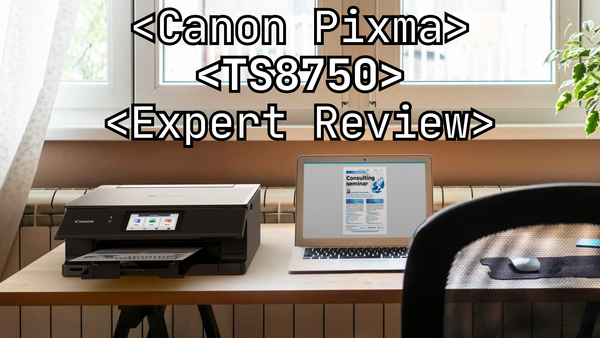
When it comes to finding a reliable, easy-to-use printer for your home or small office, the Canon Pixma TS8750 is a strong contender. If you’re like many of my customers, you’re likely searching for a printer that offers great print quality, a sleek design, and simple connectivity without breaking the bank. That’s where this model fits in.
In this review, I’ll take you through the ins and outs of the Pixma TS8750, including its standout features, potential downsides, and overall performance. Whether you're printing photos, documents, or school projects, I'll give you my honest assessment to help you decide if this printer is right for you.
So, let’s dive into why Canon continues to be a trusted name in the printer world and how the Pixma TS8750 measures up to its reputation.
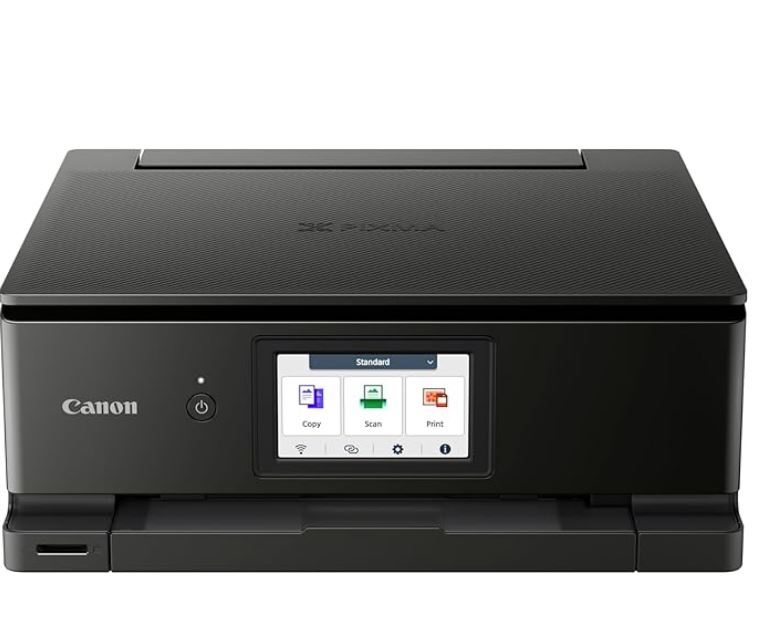
Canon Pixma TS8750

- A4 Colour Inkjet
- Wireless, AirPrint, Mobile Printing
- Duplex Printing
- Print, Copy, Scan
Why Choose Canon?
Okay, so why consider a Canon printer in the first place?
My experience with Canon printers has taught me that what they might lack in bells and whistles they make up for in their reliability and being super easy to use.
They’re not the flashiest, but they’ve built a solid reputation over the years for doing what they do best—making high-quality, user-friendly printers that just get the job done. And hey, they've been at it since forever, so they know what they're doing. Plus, they’re usually pretty affordable without skimping on the quality.
Canon Pixma TS8750 Design
Alright, let’s talk about the Canon Pixma TS8750's design because, honestly, I’m a bit of a sucker for a good-looking printer—and this one definitely ticks that box. First off, it’s lovely and compact, which is a huge plus if you’re thinking of squeezing it into a home office or trying to find space in an already crowded desk setup.
When it comes to build quality, I’ve got no complaints. Canon always does a solid job on the materials, and this model feels sturdy enough to handle regular use. I wouldn’t call it heavy-duty, but for home or small office use, it’s durable enough to last you years.
The plastic casing doesn’t feel cheap, which is something I notice a lot in other budget printers. I’ve had my hands on enough printers to tell when something’s going to fall apart after a year or two, but this one seems like it’s in it for the long haul.
If I had to sum it up: the Canon Pixma TS8750 is not only practical in terms of space, but it’s also a stylish piece of equipment that won’t be an eyesore in your home office. Plus, it feels solid enough to stick around for a while, so you’re getting both form and function.
Key Features of the Canon Pixma TS8750
The Canon Pixma TS8750 is packed with useful features that deliver on Canon’s signature ergonomics. It supports wireless printing and a mobile app (more on that later), so you can easily print from your phone, laptop, or tablet without any cables. It also has automatic duplex printing, which is great for saving paper with double-sided prints.
One of my favourite features is the two paper trays—there’s a tray underneath for regular sheets and another on top for custom-sized paper, like photo paper. The motorised output tray extends automatically when you start a print job, which is a nice touch.
All in all, it’s a well-rounded machine with thoughtful features designed to simplify the whole process.
Paper Compatibility
The Canon Pixma TS8750 comes with a 100-sheet input tray that’s designed specifically for A4 paper. It doesn’t support larger paper sizes like A2 or A3, so keep that in mind if you regularly work with oversized prints.
Paper Thickness
For standard 80gsm office paper, the main input tray works perfectly. But, if you're printing on thicker paper—anything over 120gsm—I'd recommend using the rear paper feed.
From my tests the main tray struggled with thicker paper, but the rear feed handles up to 300gsm with no issues. It’s more durable and reliable for heavier paper types, making it ideal for printing on card stock or other specialty papers.
Print Speed
The Canon Pixma TS8750 isn’t the fastest printer available, but unless you’re doing large volumes of printing, it’s not a big deal. For everyday tasks, I’d say it's more than quick enough. When it comes to high-quality photo prints, it’s actually pretty reasonable in speed.
To be more specific, when I tested it I managed to print around 10 colour images per minute or about 15 black-and-white pages. So it's not lightning-fast, but it strikes a good balance between speed and quality, especially for photo printing.
Quality
Canon is known for its excellent colour science, and that expertise shines through in the Pixma TS8750. While this model isn’t a high-end, professional printer, it still delivers solid quality across various tasks, from document printing to photos.
Canon’s reliability when it comes to producing accurate, vivid colours and crisp details is one of the reasons they’re a trusted brand. Even in a more budget-friendly, multi-functional model like the TS8750, you still get that dependable print quality that Canon is known for.
Print Quality
The Canon Pixma TS8750 offers impressive print resolution and solid colour accuracy for its price range.
This model only uses four cartridges, so the nuances of colours are not as rich as the PROGRAF series from Canon, which uses twelve Canon ink cartridges. That’s one of the reasons I wouldn’t recommend the Pixma TS8750 for a professional photographer or graphic designer because you’ll really notice the difference in a higher end model.
Black-and-white prints come out crisp and clean, but the colour prints are where you see Canon’s expertise at work.
This printer handles photos well, but it’s not a professional-grade photo printer—it’s a multi-use device that does a good job for everyday printing and occasional photos.
Scanner Quality
The scanner on the TS8750 is decent, though not without its quirks. Scanned images can sometimes appear a bit faded. The scanner supports resolutions from 70 dpi to 1200 dpi, but in practice, the lenses sometimes miss focus slightly, which can cause a slight colour shift.
This means that if you scan a document and then print it again, you may see a noticeable difference in colour accuracy and sharpness. So if you need the printer for tasks that rely on high-quality scanning like digitising artwork or photos, you might consider a higher-end model. But for everyday use, you’re probably not going to notice it.
Copying Quality
Interestingly, when I tested the photocopy function on the TS8750, it produced better results than the scanner in many cases. When you press the photocopy button, especially for colour copies, the quality is closer to the original document with fewer issues in colour shifting.
So, that’s my little tip for this model - if you’re not quite satisfied with the scanner quality, use the photocopy function instead.
Using the Canon Pixma TS8750
Set-up
Alright, let’s talk setup, because Canon really makes it easy here. If you've ever struggled with tech, you’re going to love how simple this one is.
To get started, you'll scan a QR code that's included in the instructions. This takes you to a guided installation on your phone or computer—no confusing steps, just clear directions. You'll feel like you have a tech-savvy friend walking you through it.
Next, you’ll manually load the Canon PGI-530 and CLI-531 ink cartridges, which comes in a set of six cartridges (Pigment black, black, cyan, magenta, yellow and grey). The ink installation is fool proof with colour-coded slots—there’s no way you can mess this up. Once that’s done, you load your paper in the rear tray, and then the printer takes over.
It’ll automatically launch a calibration print. You’ll just need to pop this page into the scanner for a quick scan to calibrate the colours. And guess what? That’s it, you’re ready to print.
Mobile App
There’s an app for everything these days, and the Pixma TS8750 is no exception. Downloading the Canon PRINT app lets you do pretty much everything from your phone.
You can print documents directly from your device. From the scanning side of things, you can use the app to scan documents using your phone’s camera or the printer itself, and have the files sent directly to your phone—so convenient.
Oh, and don’t forget about the ink level monitoring. As long as the printer is powered on, you can keep tabs on how much ink is left through the app. No more running out of ink mid-project.
Connectivity Options
Wireless and Wired Connectivity
The Canon Pixma TS8750 offers multiple ways to connect, and it couldn’t be easier. You’ve got both wired (USB) and wireless (Wi-Fi and Bluetooth) options.
Connecting over Wi-Fi is a dream—it’s seamless, and once connected, you can pretty much print from any device in your home without any annoying connection drops. Being able to print wirelessly is perfect for those of us who work on laptops or tablets and don’t want to or simply can’t plug in to the printer every time we’re printing. It's really easy to do as well and you'll be pleased to hear I've written a blog on how to connect your printer to Wi-Fi.
AirPrint is another big win here, especially for Apple users. No extra software needed—just select the printer from your iPhone or iPad, and you’re good to go. I use AirPrint all the time when I need to quickly print out a ticket or something from my phone. Total lifesaver!
The TS8750 is compatible with Windows and Mac computers, of course. But it also works well with smartphones and tablets, which can’t be said for all printers.
Cost Efficiency
Ink Cartridge Costs
Usually, this is the question I get the most. What’s the ink going to cost me?
Well, the Canon Pixma TS8750 uses a 6-cartridge system (pigment black, black, cyan, magenta, yellow and grey), and while it’s a solid performer, the cartridge sizes are admittedly not the largest capacity inks.
For home users this won't be a deal-breaker, but if you're a frequent printer, you’ll likely burn through those colour cartridges pretty fast.
Overall Cost per Print
So, how does the cost per print break down? Let’s crunch some rough numbers:
Black and white printing can be even more affordable, especially if you choose to use the recycled Canon inks. The 2 black cartridges will cost between 1 and 2 pence per page to print.
Colour printing will be a little more. Averaging out the cost you'll pay roughly 1.5 to 2.5 pence per page. These prices will at the very least double when using the genuine Canon OEM inks.
If you’re printing photos or anything that’s heavy on colour then the cost per page can rise even higher. This isn’t unusual for inkjet printers in this price range, but it’s something to consider if you plan to print a lot of full-colour materials.
Overall, the Pixma TS8750 is fairly efficient for occasional printing and I’d recommend it for home office use, kids homework and the like.
But, if you’re shopping for an office printer for even a small team or planning on doing a lot of heavy-duty colour printing, I’d suggest looking at one of Canon’s other models that have a better cartridge capacity.
Canon Pixma TS8750 Pros and Cons
To recap what I’ve taken you through, here is a list of the pros and cons you should consider for this printer.
Pros
- Usability: Like with other Canon printers, this model is very easy to use. Set up is a breeze, wireless connectivity and ultra-intuitive software. Great for the tech-wary!
- Compact Design: Perfect for home offices or limited desk space.
- Great Print Quality: Delivers impressive photo prints and crisp documents, living up to Canon’s reputation for strong colour accuracy.
- Mobile App: The Canon print app lets you print, scan, and monitor ink levels straight from your phone.
- Media: Not only can you print on different types of media, printing direct on a CD/disk is also an option with this printer.
- Cloud: Connect to your Google Classroom, Google Drive, Dropbox, OneDrive, Evernote, Google Photos for even easier sharing.
Cons
- Cost per Print: The ink cartridges aren't huge in capacity and can be pricey when choosing the Canon original inks, especially for colour printing, which can be at least double the cost of using recycled inks.
- Slow Print Speed: It's not the fastest, especially for colour prints—better suited for occasional use.
- Limited Paper Compatibility: Only supports standard sizes like A4, which might be restrictive for certain projects.
- No Heavy-Duty Use: If you need to print high volumes regularly, the PGI-530 CLI-531 cartridge capacity probably won’t cut it.
My Verdict: Is the Canon Pixma TS8750 worth it?
If you're in the market for a reliable, easy-to-use printer for light home or office use, the Canon Pixma TS8750 is definitely worth considering. In terms of print quality, it’s more than enough for printing family photos, school assignments, or the occasional work document.
But I wouldn’t recommend it for anyone needing frequent, high-volume printing. The ink cartridges don't have huge capacity and can expensive, especially for colour printing, and the print speed could be faster. If you’re in the market for a printer that can handle higher capacities, take a look at the Canon MAXIFY GX6050 or HP OfficeJet Pro 9125e.
OUTTAKES
Comparison of the Canon Pixma TS8750
I’ve compared the basic stats of Pixma TS8750 to a comparable model from the other major printer brands, and you’ll be able to see that there are some pros and cons of each.
| Printer Model | Prince Range | Cost Per Page | Ink Type | Print Speed | Paper Capacity | Max Print Resolution | Special Features |
|---|---|---|---|---|---|---|---|
| Canon Pixma TS8750 | £120 - £160 | 1 - 2p (B&W & Colour) | 6 Ink Cartridges | 15 ppm (B&W) / 10 ppm (Colour) | 200 Sheets | 4800 x 1200 dpi | AirPrint, Canon PRINT app, CD Printing |
| Epson EcoTank ET-2862 | £240 - £280 | < 1p (B&W & Colour) | Refillable Ink Tanks | 10 ppm (B&W) / 5 ppm (Colour) | 100 Sheets | 5760 x 1400 dpi | Refillable ink, Low cost per print |
| HP Envy 6420e | £80 - £125 | 11p (B&W) 13p (Colour) | 2 Ink Cartridges | 10 ppm (B&W) / 7 ppm (Colour) | 100 Sheets | 1200 x 1200 dpi | HP+ Smart Printing System |
| Brother MFC-J1300DW | £210 - £310 | INKvestment Cartridges12 ppm (B&W) / 10 ppm (Colour)150 Sheets6000 x 1200 dpiHigh Yield Ink, Auto Duplex Printing |
My Key Takeaways:
- Canon Pixma TS8750: Great for occasional use, especially if you prioritise wireless connectivity and mobile app features. However, the cost per colour print can be high.
- Epson EcoTank ET-2862: Ideal for high-volume printing with ultra-low ink costs due to refillable tanks, though the upfront cost is higher.
- HP Envy 6420e: A good middle-ground option with affordable pricing.
- Brother MFC-J1300DW: Offers a solid balance with very low ink costs and fast print speeds, thanks to its high-yield cartridges.
Blog Author: Simon Cross is the engaging and knowledgeable voice behind the insightful articles on printers and printer consumables at IJT Direct, an ecommerce store renowned for its comprehensive selection of printers, printer consumables, and hardware. View Simons author page to find out more about him.
Browse Our Top Ink Cartridges