
What Is A Wireless Printer?
A wireless printer is one that requires no cables and works solely off Wi-Fi. This feature comes with many benefits but just like everything also comes with downsides. When compared to a wired model the wireless is generally better, however comes at a higher cost and with a few caveats, meaning individuals must make their own decision about which type of printer suits them based on their personal needs.
How Do Wireless Printers Work?
Okay so, what exactly is a wireless printer? Simply put, a wireless printer connects to your phone or computer through Wi-fi, instead of having to use a cable. This means you can print from your laptop, smartphone, or tablet without needing to physically connect to the printer.
This really tidies up your work space as you wont have cables all over the place getting tangled and caught on things, as well as make your printing simpler as with wireless printing it just takes a few presses from your device.
Connecting to the internet
Alright so first things first, your wireless printer needs to connect to your Wi-Fi network. When you’re setting your wireless printer for the first time you’ll probably use the printers control panel, where you’ll have to enter your Wi-Fi password.
Honestly, setting up a wireless printer should be pretty straight forward as they come with step by step instructions for set-up. This is definately true of HP printers and you can read more in my blog detailing how to connect to a HP wireless printer.
Communication with Devices
Now, once you've got your printer setup you’ll need to link it to your devices. These will be your phone, computer, laptop etc, the things you’ll be printing from.
To give you an example of how this will work, imagine you need to print something from your phone. You’ll simply select the document to print on your phone, select the wirelessly connected printer and hit print. Your phone and the printer will communicate wirelessly and the document will start printing.
Bluetooth Printing
Okay, so a slightly different method of wireless printing to Wi-Fi is Bluetooth which works the same as Wi-Fi except it's quicker and doesn't require as much setup.
This will mean you can still print on devices and printers that aren't connected to the internet. For example, if you have a garage or extension where your home Wi-Fi doesn't reach you should consider finding a printer with Bluetooth.
Although, it's important to know that Bluetooth has less range than Wi-Fi so you’ll have to be pretty close to the printer to use it.
Cloud Printing
You’re also going to have this nifty feature called cloud printing. So, this means you can print from anywhere as long as your printer is online. For example, you could be at a café and see an interesting article on your phone, and send it to your printer at home. By the time you get back, the printout is ready and waiting for you.
Mobile Apps and Integration
Nowadays a lot of printers come with their own apps to download on your phone or tablet that make it super easy to print photos, documents, or even web pages. Some apps also allow you to scan documents using your printer's scanner and save them directly to your mobile device.
So in summary, wireless printers use Wi-Fi and Bluetooth to handle all your printing needs smoothly without the hassle of needing to use cables. As well as giving you the use of modern technology to make printing fast and flexible from your devices.
Pro and Cons of Using a Wireless Printer: Are They Worth It?
Okay so you know what a wireless printer is and how it works but there’s still the question of are they any good?
The answer is that it depends on the person. A wireless printer has plenty of upsides but just like anything comes with the bad too. Whether A wireless printer is for you depends on how you weigh up the pros and cons and the decision that leads you to.
The Pros Of Using a Wireless Printer
Wireless printers are convenient and flexible
One of the biggest perks of a wireless printer is the freedom you get from no cables. You can put your printer anywhere you like as long as it's in the range of your Wi-Fi. So now there's no need to worry about being tethered to your desk or finding space for endless cords.
Being able to print from any device is a huge bonus. So no matter where you are in your house and on whatever device, you can send documents to your printer.
This is absolutely great for flexible printing as you won't have to be emailing documents from device to device before you can finally print. You’ll simply tap a few times and you’re away.
Most wireless printers are simple to set up
A huge plus for most wireless printers is their setup is typically very straightforward, as modern printers usually come with user friendly apps or onscreen instructions so you’ll be able to fly through the set-up.On the same note, a lot of wireless printers come with their very own phone app nowadays. These apps will make it really easy to print, scan and manage the printer using a device, which trust me, are easier to work with than printer screens.
Added bonus! You’ll be able to monitor your ink levels on these apps and even order replacement cartridges, giving you peace of mind you get ones that fit your printer with just a few taps.
Wireless printers can connect to multiple devices
It's really impressive that a wireless printer can connect to multiple devices around the household, and even accept printer orders at the same time that get put in a queue!
This is great for a busy household or small office as multiple people can print without having to physically touch the printer, meaning no traffic jams and swapping cables for each person.
In my opinion cloud printing has got to be one of the best things about wireless printers. So if you get a cloud service like Apple Airprint you will be able to send documents to your printer at home from anywhere.
So you could be in a café or walking in the park and you'll be able to send a document home to be printed.
This is the definition of flexible printing, you literally can now print from anywhere using your phone meaning you can do important printing tasks even when you're away from your printer
Wireless printers have low running costs
The sleep mode feature wireless printers have is really impressive and a huge plus for electricity bills. Most wireless printers are able to go into sleep mode which uses virtually no power until they receive a printing job where they come to life, get the job done then enter sleep mode again until needed.
Honestly not having cables is going to be a money saver too, as you wont need to buy new or replace any connectors or cables needed to run the printer. This can actually add up over the years so not having these costs to worry about is a great thing.
The Cons Of Wireless Printers
Wireless Printers Depend On Wi-Fi
Now one of the downsides of owning a wireless printer is the device runs off Wi-Fi. So if your network is running slow then so will your printer which can cause some frustration if you have important work to do.
Another thing is if your wi-fi goes out your printer is basically useless, so if anything happens to your Wi-Fi your printer will be affected too which can be doubly annoying and mean printing grinds to a halt.
However, Wi-Fi outages aren't too common and there are always ways around it such as hot-spotting on your mobile device. So although it has the potential to be frustrating, its not a deal breaker.
Wireless Printers Have a High Initial Cost
A definite downside to buying a wireless printer is the high initial cost. While yes it is true that they have some advantages over wired printers you’ll have to pay for the convenience.
Now for some people the convenience isn't worth the higher cost as they wont use the wireless capability much, but for those who will be using the wireless features the higher price will absolutely be worth the convenience and other benefits.
To sum up
Okay so, in summary, while there are many great things about a wireless printer such as convenience, flexibility and a low running cost. But they also have their downsides in the form of Wi-Fi dependency and high initial costs.
Whether a wireless printer is really worth it depends on you. If you’re someone who values the convenience and perks that a wireless printer gives you more than buying cheap then going wireless is a great option for you.
Also, having a strong stable Wi-Fi network might mean a wireless printer will work great for you, whereas if your Wi-Fi is poor and patchy going wireless might be frustrating so you may want to consider a wired option.
For those of you who won’t be doing lots of wireless printing and so won't be using the features this machine won't be worth the high cost, it would be best for you to look into a wired budget model to get better money's worth.
Wireless vs Wired Printers
Okay so if you're wanting to buy a new printer and deciding between wired or wireless it's important for you to see the comparison of different features.
Which printer is better is totally personal to you, so we just want to make sure you can make a good informed decision about which printer to buy.
Where Wireless Is Better
Honestly a wireless printer is a lot more convenient as you can print from anywhere in your house, without having to deal with cables getting in the way.
A stand out feature is multiple users can connect and print without having to take turns, this is great for families and offices
You won't have as much clutter on your desk and you're not fixed to printing from one spot like you are using a wired printer, as there are no cables to run.
Cloud printing is a brilliant feature, you can print documents remotely from wherever with cloud services. So you can be printing important documents from a café with a wireless printer, something you cannot do with a wired one.
Where A Wired Printer Is Best
Since your device and printer are directly connected with a USB you’ll always have a stable connection. So you don’t have to worry about your connection dropping just before you need to print something important.
Okay so connecting to Wi-Fi can mean there are security risks, so a wireless connection means less risk of hacking or unauthorised access. This basically means your data stays more secure.
Wired printers tend to be cheaper. If you’re on a budget, this might be the way to go.
In conclusion both wired and wireless printers have their advantages and disadvantages so it is up to you to decide which one suits you more.
I’d suggest for someone who lives in a busy household or works in a small office that a wireless printer would suit them better, as multiple devices can connect and even send documents to print at the same time.
This will be way more convenient than swapping over cables to different devices many times over, especially if you use cloud printing where you can do so from anywhere using your phone.
Although if you've got patchy Wi-Fi a wired printer connection is the way to go, as it will get frustrating if your Wi-Fi keeps dipping in and out when you're trying to print.
If you're on the lookout for a budget printer then maybe a wireless machine isn't for you, as they tend to be a fair bit more expensive than wired printers. So if you don’t feel the need to spend on convenience, stick to a wired printer which tends to be cheaper.
The Best Wireless Printers
Epson WorkForce WF-2930DWF
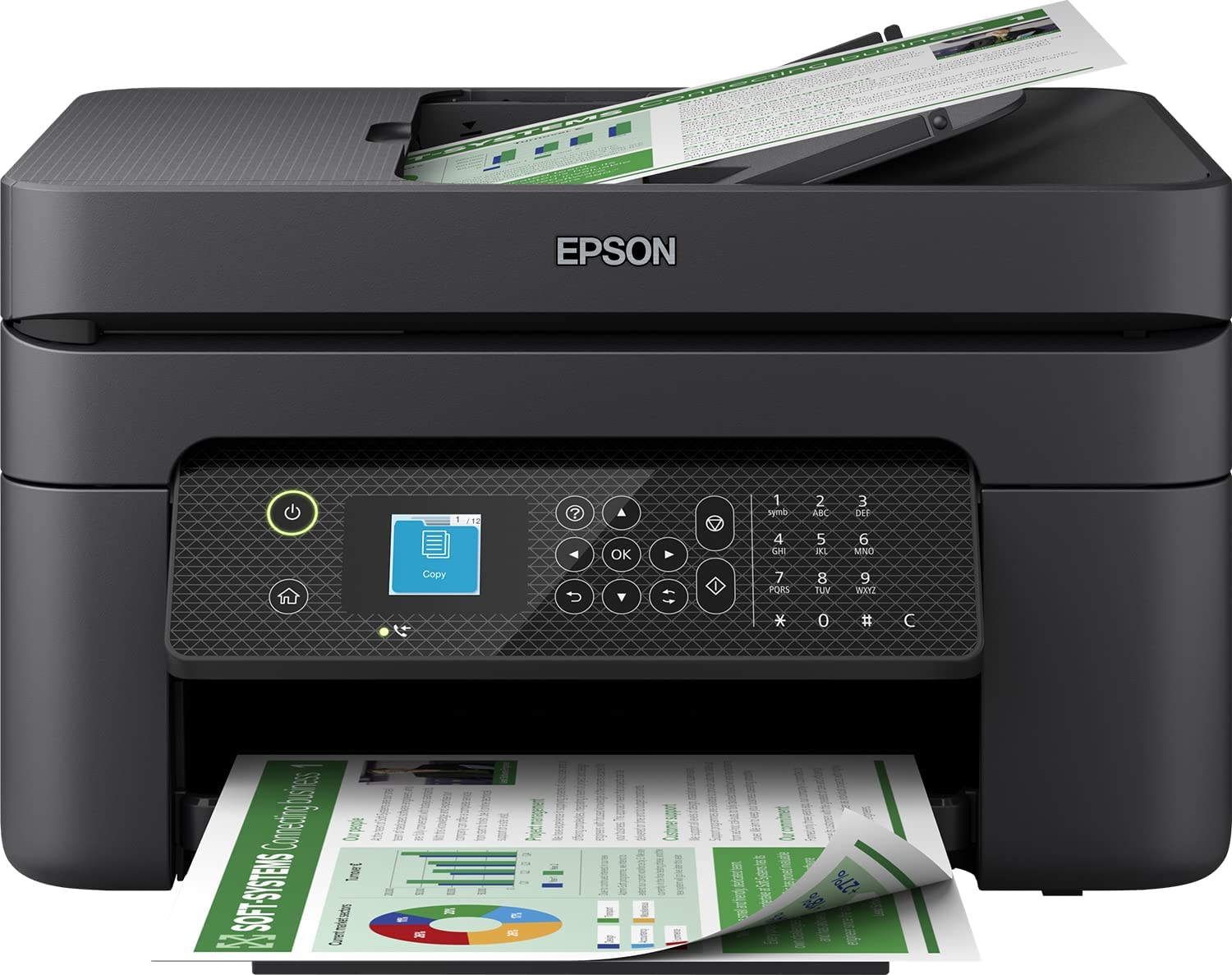
Wireless Printer for the Home & Small Offices

- Print, Scan, Copy and Fax
- Mobile printing
- Budget-friendly
- Individual ink cartridges
Now if you're looking for a wireless machine to run a busy household or small office, the Epson WorkForce WF-2930DWF might be your hero. This no-frills multifunction printer is all about getting the job done without breaking the bank.
It isn't a super fancy gadget loaded with bells and whistles, but what it does, it does well. It's a workhorse for everyday tasks like printing, scanning, copying, and faxing. And the best part? You won't break the bank for this little gem.
Pros
So here's the rundown:
- This machine does it all: Print, scan, copy, and fax – this printer tackles everyday tasks with ease.
- Mobile printing: No more scrambling for a computer. Print documents straight from your phone or tablet using the Epson app.
- Budget-friendly: This all-in-one offers excellent value compared to similar models with the same features.
- Individual Epson ink cartridges: No need to replace a tri-colour cartridge when just 1 of the colour runs out, replace only the colours you need to. This saves you money as well as being more environmentally conscious.
Cons
- You might call this printer the jack of all trades, master of none. As although it delivers solid performance, other specialised printers may offer faster speeds or higher quality for specific needs.
- To be frank ink prices for this machine can add up, so consider using recycled ink cartridges if you print frequently, as genuine Epson ink can be pricey.
What I thought
I was very impressed with how easy the setup was, so no need to be a tech whiz to get it going.
This machine is a really reliable performer. It handled everything I threw at it with consistent, high-quality results.
The multifunctionality of this printer was really impressive. This printer is a workhorse, always ready to handle any printing, scanning, copying, or faxing needs.
Honestly I was really impressed with this machine, the Epson WorkForce WF-2930DWF is a lifesaver for busy individuals who prioritise functionality and affordability. It offers excellent value for the features you get, making it a great choice for those who don't need a top-of-the-line printer.
Canon Pixma TS3350

Wireless Printer for Photos & Documents

- Sharp & vibrant prints
- Mobile printing
- Versatile printing
Okay, this really is a great wireless printer that delivers stunning photos and crisp documents. We tested it for months on various tasks, and it impressed us with its quality, convenience, and space-saving design.
Pros
- Be it photos or documents the Canon TS3350 delivers sharp, vibrant prints. Text is clear without bleeding, and photos have smooth colour changes.
- The fact this machine is wireless is fantastic. You can ditch the cables and print directly from your phone or tablet using the Canon app. It's a breeze to set up and saves you precious time.
- I was very impressed with just how versatile this printer is, going beyond everyday tasks. It can handle greeting cards, stickers, and more, making it perfect for fun home projects.
Cons
- Now, like most inkjet printers the cartridges can be expensive, especially if you're doing a lot of printing, so consider using recycled cartridges to minimise costs.
- I would say the display is a bit small, which does make menu navigation slightly hard at times. Thankfully, there is the option of using an app to navigate it
- Okay so for high volume printing an automatic document feeder would be a time-saver, but for small documents this thing handles great.
What I thought
In summary the Canon Pixma TSSS350 is ideal for someone who prioritises high-quality printing for photos, documents, and the odd creative project. If you're a high-volume printer or cost is a major concern, then you should look into models with lower ink costs or an automatic document feeder.
Brother MFC-L8690CDW

Wireless Printer for Productivity

- Great for high-volume printing
- Loads of features
- Great touchscreen
Honestly this laser printer has all the bells and whistles as well as the productivity. It will give you top-notch quality at a fantastic speed, and a variety of functions that make home printing a doddle. While it comes with a premium price tag, the capabilities definitely justify the investment.
Pros
- It has to be said from black and white text to vibrant colours, everything this machine prints is amazingly crisp and clear.
- If you Need to churn out documents quickly this printer tackles high-volume printing effortlessly.
- Look, we really believe this printer is great for convenience as this thing does it all. You’ll be able to print, scan, copy, and fax which will Save you space and simplify tasks.
- The touchscreen interface is brilliant, making navigating the machine's features easy.
Cons
- Okay so the high price tag is something to consider, but just remember the features and quality do reflect in the price.
- This machine is pretty big, but nothing some careful placement cant solve.
- Now, because there are so many features on this printer the set up time is above average, although once you are set up you’ll be good to go for the life of the printer.
What we thought
Okay so I know the initial cost might seem high, but for professional document printing, graphic design, or artistic endeavours, this printer is a worthwhile investment. If top-quality, high-speed printing is important for your work, and you're ready to invest in a feature-packed machine, this is the one. Yes, it comes at a premium, but you get what you pay for – exceptional quality, efficiency, durability, and a range of fantastic features.
However, if you don't require top-tier quality, massive prints, or fancy features, a more basic and budget-friendly option might be a better fit. There's no point in overspending on a machine that is beyond your needs.
Ultimately, this Brother MFC-L8690CDW excels for those who can maximise its capabilities. If you fall into that category, you're looking at one of the best machines on the market. For those with more basic printing needs, a more affordable option might be a better buy.
Conclusion
Alright so there we have it, that's a comprehensive look at what a wireless printer is and if they might be suited to you.
Remember, everyone's needs are different so you need to think about what you want from a printer and use this guide to make the most informed decision about whether a wireless printer will suit your printing needs.
While wireless printers offer convenience and flexibility, they aren't always cheap and come with the caveat of needing a good stable Wi-fi connection to work. So consider the pros and cons of and come to your own educated conclusion to whether they'll be worth it for you.
Even after you've made the decision on wireless vs wired there is still a choice to be made about which model and brand, which again is personal to everyone's needs.
So don't be afraid to have a look on our website for a range of wired to wireless printers, from budget to premium we will have the perfect printer for you. Our brilliant and knowledgeable sales team can help you find the most suitable printer for you so give them a call!
Blog Author: Simon Cross is the engaging and knowledgeable voice behind the insightful articles on printers and printer consumables at IJT Direct, an ecommerce store renowned for its comprehensive selection of printers, printer consumables, and hardware. View Simons author page to find out more about him.
Browse Our Top Ink Cartridges