
Best Beginner 3D Printer
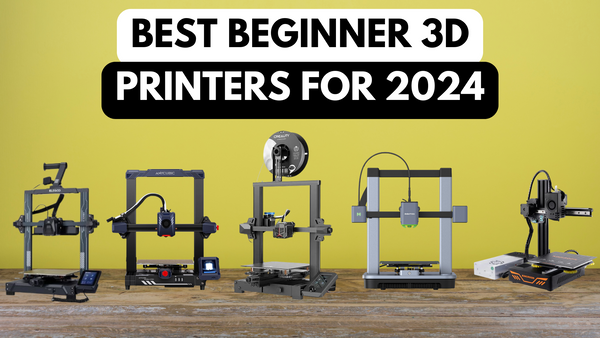
The Elegoo Neptune 4 emerges as the best beginner 3D printer for its balance of high-speed printing, ease of use, and exceptional build quality, complemented by a supportive community and great value for money. Its user-friendly interface and large build volume offer newcomers a versatile platform for exploring 3D printing, making it the top choice for those starting their 3D printing journey.
| Elgoo Neptune 4 #1 | AnkerMake M5C #2 | Creality Ender 3 V2 Neo #3 | Anycubic Kobra 2 Pro #4 | Kingroon KP3S 3.0 #5 |
Choosing a Beginner 3D Printer: Key Factors
Price point
An affordable price is essential for beginners, making 3D printing accessible without a hefty investment. A lower price point reduces the entry barrier for beginners, and ensures that learning how to 3D print is financially feasible.
Ease of assembly
For beginners, a printer that is easy to assemble with clear instructions is vital. This minimises setup frustrations and helps novices understand the mechanics of their printer. By making the assembly easy, there is a solid foundation for troubleshooting and upgrades.
User interface and software
A user-friendly interface and intuitive software are critical for a smooth learning curve. Simplifying the initial interaction with 3D printing technology encourages continued use and exploration, essential for beginners to build confidence.
Print quality
Good print quality, even at basic settings, is important for encouraging beginners. It ensures that new users can immediately see the results of their efforts, motivating continued learning and experimentation.
Material compatibility
Support for a range of filaments suitable for beginner projects is key. This allows novices to experiment with different materials and learn about their properties and uses, broadening their 3D printing skills.
Safety features
Safety features such as enclosed printing areas and automatic shutdown are crucial for beginners. These features protect users from common hazards, making the learning process safer and more enjoyable. Of course, no one wants to buy an unsafe 3D printer, let alone a beginner.
Community and support
Access to a supportive community and robust customer support is invaluable for beginners. It provides a safety net for troubleshooting, learning, and sharing experiences, accelerating the learning process. Forums, YouTube tutorials and support are all vital for getting the best 3D printer for beginners.
Reliability
A reliable printer with minimal failures reduces frustration and waste, crucial for maintaining enthusiasm. Reliability ensures a positive initial experience, crucial for keeping beginners engaged and willing to continue learning. Not only that, but you don’t want to spend your budget on something that breaks down in a few months.
Scalability
The ability to upgrade and expand the printer's capabilities as skills grow is important. Scalability allows the printer to evolve with the user's needs, making it a long-term learning tool rather than a short-term investment. The best printers will allow you to grow with its features.
Warranty
A comprehensive warranty protects beginners from defects and failures. Knowing that their investment is protected, beginners can experiment and learn without worrying about potential hardware issues.
5 Best 3D Printers for Beginners
1. Elegoo Neptune 4
Overview
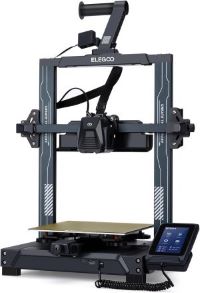
The Elegoo Neptune 4 is a 3D printer known for its impressive printing speeds and spacious build volume, making it a contender for hobbyists and makers looking to create larger projects.
I’ve chosen this as the best 3D printer for beginners because of a number of reasons. Mostly to do with its speed, it’s very easy to use even without any experience and it’s simple to understand the user interface.
Here's a breakdown of its features and suitability for beginners:
Key features
- High printing speeds: Up to 500 mm/s, significantly faster than most entry-level printers.
- Large build volume: 225 x 225 x 265 mm, allowing for larger prints compared to basic models.
- Klipper firmware: Offers advanced customization options for experienced users.
- Dual-gear direct extruder: Improves filament feeding consistency and reduces the risk of jams.
- PEI spring steel printing bed: Offers good adhesion and easy print removal.
Pros and cons
Pros:
- Fast printing: Saves time on larger projects.
- Large build volume: More versatility in the types and sizes of objects you can print.
- Quiet operation: Compared to some faster printers.
- User-friendly interface: Easy to navigate for beginners.
Cons:
- Semi-automatic bed levelling: Requires manual adjustments, which can be challenging for beginners.
- Limited filament compatibility: Currently only supports PLA and PETG filaments.
- Newer model: Less user experience and troubleshooting resources compared to established models.
Why it’s good for beginners
The Neptune 4 offers faster printing speeds compared to most beginner printers, which can be appealing for those who want to see results quicker.
The large build volume opens up the possibility of printing larger objects, which can be motivating for beginners.
The user-friendly interface makes it easy to get started and navigate the basic functions.
However, it's important to note the potential drawbacks:
Semi-automatic bed levelling can be a hurdle for beginners unfamiliar with the process.
Limited filament compatibility may restrict your material options initially.
As a newer model, there might be fewer readily available resources and troubleshooting guides compared to more established printers.
Overall experience:
Overall, I've really enjoyed the Elegoo Neptune 4. The speed and build volume are fantastic for our needs, and it's surprisingly quiet.
However, the semi-automatic bed levelling and limited filament compatibility might be hurdles for some beginners.
If you're comfortable with a little tinkering and are excited about the potential of a speedy and spacious machine, this printer is definitely worth considering.
2. AnkerMake M5C
Overview
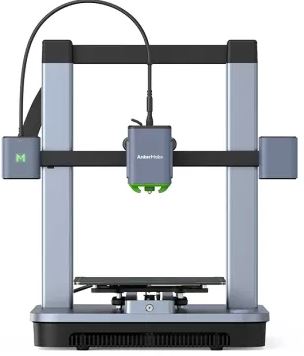
The AnkerMake M5C 3D printer drops in to second place in my picks for the best beginner 3D printer. The M5C is aesthetically pleasing on the eye, offers a fast printing mode as well as being compatible with 7 different types of printing filament.
It was fantastic in many different ways, but here are the key factors that I found:
Key features
- High-Speed printing mode: Up to 500mm per second which is significantly faster than most printers on the market.
- One-Click button: Get printing at a single click, no need for a complicated and time consuming set up.
- Multiple filament types: compatible with 7 different types of printing filament including PLA, PLA+, PETG, ABS, TPU, carbon fibre and wood composite.
- 7x7 auto-levelling: Simplifies setup and ensures consistent printing quality.
- Mobile app control: Monitor and control your printer from anywhere using your smartphone.
Pros and cons
Pros:
- Unmatched speed: Saves significant time, especially for larger prints.
- Seamless setup and use: User-friendly features and mobile app control make it easy to get started.
- Easy to use software: The included Slicer software is intuitive and use friendly.
- Reliable printing quality: Auto-levelling and consistent filament feed ensure successful prints.
Cons:
- No display screen or camera: Printing done through computer connectivity and no camera to monitor printing progress.
- Requires Wi-Fi: Connecting to a computer is straightforward but it requires wireless connectivity to make that connection.
- Requires a mobile app: When a filament needs replacing the mobile app is required to load and unload.
Why it’s good for beginners
The user-friendly features and mobile app control make it easy to learn and operate, even for those new to 3D printing.
The auto-levelling and consistent printing quality minimise setup hassle and frustration, allowing beginners to focus on the creative aspects.
The Slicer software is really easy to use and a fun and engaging element to the learning process, keeping beginners engaged throughout the learning process.
Overall experience:
As a complete beginner with no prior 3D printing experience, I found the AnkerMake M5C incredibly user-friendly. The mobile app guided me through the setup process, and the auto-levelling feature eliminated any concerns about bed calibration. It was very easy for us to use.
The overall experience was smooth, engaging, and produced high-quality prints.
3. Creality Ender 3 V2 Neo
Overview
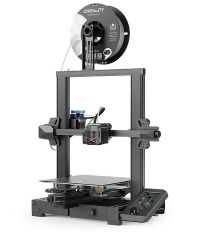
In 3rd position as one of the best beginner 3D printers is the Creality Ender 3 V2 Neo. It’s a popular and affordable 3D printer known for its reliable performance, user-friendly features, and large online community.
It's a solid choice for beginners looking for a good balance of functionality and value. Here are more details around some of the things I found most impressive about this 3D printer.
Key features
- CR Touch auto-levelling: Simplifies setup and ensures consistent printing quality.
- Full-metal Bowden extruder: Durable and reliable for smooth filament feeding.
- PC spring steel magnetic build plate: Offers good adhesion and easy print removal.
- Silent mainboard: Reduces operational noise for a quieter printing experience.
- Open-source design: Allows for customisation and modding for experienced users.
Pros and cons
Pros:
- Affordable price point: A great value for beginners who want to get started without breaking the bank.
- Easy to use: User-friendly features and large online community make it easy to learn and troubleshoot.
- Reliable printing: Consistent performance and durable components minimise printing failures.
- Upgradable: Open-source design allows for future customisation and expansion.
Cons:
- Slightly slower printing speeds: Compared to newer models like the AnkerMake M5.
- May require some assembly: While straightforward, it might involve a short learning curve for complete beginners.
- Limited warranty: Compared to some competitors offering longer coverage periods.
Why it’s good for beginners
The affordable price point makes it accessible for new users without a major investment.
The user-friendly features and large online community provide ample support and resources for learning the ropes.
The auto-levelling, reliable components and open-source design offer a good balance of ease of use, functionality, and future customisation potential.
Overall experience:
I found the Ender 3 V2 Neo to be a very good starting point for beginners looking to get started in 3D printing. The clear instructions and online community helped us navigate the initial setup and printing process.
We also loved the auto levelling feature which saved us both time and frustration from doing all of this manually. Overall, the printing quality was very impressive as well.
While the assembly process required some initial effort, the open-source design gives me the option to explore customisation in the future. Considering the price and features, the Ender 3 V2 Neo proved to be a valuable learning tool and a reliable printer for my first foray into 3D printing.
4. Anycubic Kobra 2 Pro

Overview
In fourth place, the Anycubic Kobra 2 Pro is a unique 3D printer that serves up significant advancements over any of Anycubic Kobra 3D printers before it. You get mix of really fast print speed and user-friendly features that make it ideal for beginners seeking a premium and future-proof first printer.
You can quickly see why I liked this one, and why it’s ranked as one of the best beginner 3D printers in 2024.
Key features
- High-speed printing: Up to 500 mm/s, rivalling the fastest printers on the market.
- Direct extruder: Reduces the risk of clogging and under-extrusion while supporting a wide range of filaments.
- Automatic bed levelling with LeviQ 2.0: Ensures consistent first layer adhesion for optimal print quality.
- Filament run out sensor: Automatically pauses and resumes printing if the filament runs low, saving time and filament.
- User-friendly touchscreen: Making user controls easy to access and use as well as monitoring prints.
Pros and cons
Pros:
- Exceptional printing speed and quality: Produces high-quality prints quickly, ideal for impatient creators.
- Wide material compatibility: Opens up new possibilities for experimentation with diverse filaments.
- Advanced features: Equipped with LeviQ 2.0 levelling and filament run out sensor helps to minimise printing failures and frustration for beginners.
- Smart App control: The app provides an online library of pre-programmed builds, real-time video supervision and time-lapse recording options with the addition of the (not included) camera, slicing and remote control.
Cons:
- Camera not included: To make the most of the Smart App you'll need the camera which is available but you'll need to pay extra for it
- Newer model: Less user experience and troubleshooting resources compared to established models.
- Open frame design: The majority of the time this won't be an issue but because the printing area is exposed it will be susceptible to temperature fluctuations which in term can affect print quality.
Why it’s good for beginners
The user-friendly interface and automated features like bed levelling and filament run out detection minimise the learning curve for beginners.
Being new to the 3D printer world myself I found the app a massive help to just get started.
The high printing speed and quality cater to impatient beginners who want to see results quickly.
Overall experience:
While the initial cost was higher than other options, the features and user-friendliness won me over eventually.
The auto-levelling and filament run out detection minimised setup hassles and potential printing failures, allowing us to focus on learning and experimenting with different materials.
Despite the bulkier design and newer model status, the Kobra 2 Pro's innovative features and user-friendliness made it a rewarding and future-proof investment for us on our 3D printing journey.
5. Kingroon KP3S 3.0
Overview
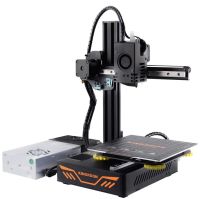
So, lastly I chose the awesome Kingroon KP3S 3.0. In a short, this is a budget-friendly 3D printer known for its simplicity, reliability, and ease of use. It's a great option for beginners who want a no-frills printer to get started with 3D printing without breaking the bank.
Now, here are the key features that I loved, hated and found with this printer:
Key features
- Open-frame design: Offers easy access and visibility to the printing process.
- Heated bed: Enables printing with PLA filament, a popular choice for beginners.
- Manual bed levelling: Requires some initial setup, but simpler to manage compared to complex systems.
- Filament run out sensor: Pauses printing if the filament runs low, minimising wasted material.
- Silent stepper motors: Reduces operational noise for a quieter printing experience.
Pros and cons
Pros:
- Highly affordable: The most budget-friendly option on this list, making it accessible for beginners on a tight budget.
- Simple and user-friendly: Easy to set up and operate, with minimal features to overwhelm new users.
- Reliable performance: Consistent printing quality with minimal maintenance requirements.
- Compact design: Takes up less space on your workbench compared to some larger printers.
Cons:
- Limited features: Lacks some advanced features like auto-levelling or enclosed build chambers found in more expensive models.
- Manual bed levelling: Requires more user involvement compared to automated systems.
- Limited filament compatibility: Primarily designed for PLA filament, with limited options for exploring other materials.
Why it’s good for beginners
The extremely affordable price point makes it a low-risk entry point for beginners unsure about committing to the hobby.
The simple design and user-friendly interface minimise the learning curve and allow beginners to focus on understanding the core principles of 3D printing.
The reliable performance and compact size make it a good choice for those with limited space or technical experience.
Overall experience:
Price is probably the best and biggest factor in this. The price was unbeatable, and the setup process was straightforward. While the manual bed levelling took some practice, the online community provided helpful resources.
The printer has been running consistently, producing decent quality PLA prints. It might lack the bells and whistles of some advanced models, but for us, it's a reliable and affordable way to learn the ropes of 3D printing without making a significant financial investment.
3D Printing Projects for Beginners
The world of 3D printing is full of exciting possibilities, but for beginners, it can be overwhelming to know where to start. Fear not! This list offers a variety of beginner-friendly projects that will help you get comfortable with your 3D printer, explore its capabilities, and have fun in the process.
Project Ideas:
Keychain Fobs: Design and print personalised key chains with your initials, favourite symbols, or even miniature objects that you love!
Phone Stands: Create a simple yet practical phone stand for your desk or bedside table. Simple, easy and ready to use.
Plant Pots: Print customisable plant pots in various sizes and designs to add a personal touch to your home décor.
Cookie Cutters: Design and print unique cookie cutters for personalised cookies or fun shapes for crafting projects.
Organisational Tools: Print handy desk organisers like pen holders, cable clips, or business card holders.
Game Pieces: Design and print custom game pieces for board games or create your own table top game with unique pieces.
Action Figures: Start small and design simple action figures or figurines to practise character creation and articulation.
Jewellery Pieces: Explore printing simple pendants, earrings, or charms to create personalised jewellery or handmade gifts.
Why these projects are good for beginners:
Simple Designs: These projects often have straightforward shapes and minimal moving parts, making them easier to print and assemble.
Short Print Times: The smaller size and simpler designs generally require less printing time, allowing you to see results quickly and gain confidence.
Wide Range of Options: You can personalise these projects to your liking, allowing you to experiment with different design elements and colours.
Functional and Practical: Many of these projects have everyday uses, making them both fun and practical endeavours.
Support Structures: Some designs may require additional support structures during printing, which you might need to remove carefully after printing.
Filament Compatibility: Ensure your chosen filament type is compatible with your printer's capabilities.
Printing Settings: While most projects provide recommended settings, you may need to fine-tune them based on your specific printer and filament.
Remember, this is just a starting point! With a little creativity and exploration, you can find endless 3D printing projects that suit your interests and skill level. Don't be afraid to experiment, learn from your experiences, and most importantly, have fun exploring the exciting world of 3D printing!
Final verdict
After careful evaluation and hands-on testing, our definitive choice for the best beginner 3D printer is the Elegoo Neptune 4. This printer stands out not only for its impressive features but also for how well it aligns with the needs of beginners stepping into the world of 3D printing.
3D printers can be used by beginners for creating games, decorations and other personalised items. Fortunately I've gone in to more detail of their capabilities in my how do 3D printers work? blog that you can ready.
Why Elegoo Neptune 4 takes the top spot:
The Neptune 4's high printing speed up to 500 mm/s makes it a standout option, allowing beginners to quickly see the results of their projects without long waits.
Despite its advanced capabilities, the Neptune 4 maintains a user-friendly interface that simplifies the 3D printing process for beginners. The combination of its intuitive software and the straightforward assembly process helps to learn 3D printing.
Offering a large build volume and maintaining high print quality, the Neptune 4 provides newcomers with the flexibility to experiment with a variety of projects, from small intricate designs to larger, more complex creations.
Considering its features, the Neptune 4 presents remarkable value for money. It balances affordability with performance, offering advanced features typically found in more expensive models without breaking the bank.
Blog Author: Simon Cross is the engaging and knowledgeable voice behind the insightful articles on printers and printer consumables at IJT Direct, an ecommerce store renowned for its comprehensive selection of printers, printer consumables, and hardware. View Simons author page to find out more about him.