
Best Canon Photo Printers | Top 4 for 2024
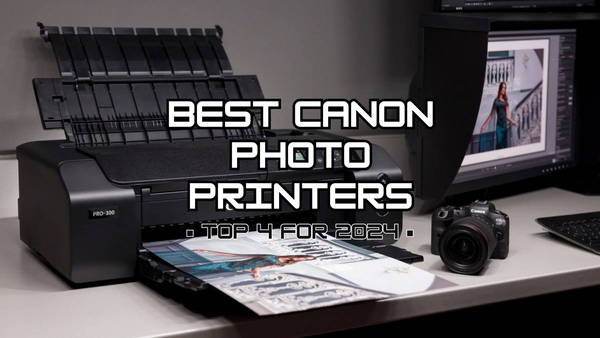
If you’re like me and love capturing memories through photos, you know how important it is to have a good printer that can bring those moments to life. But finding the right photo printer can feel overwhelming with so many options out there.
Worry not because I've spent the time and done the homework for you. I’ve tested and narrowed down an extensive list to what I believe to be 4 of the best Canon photo printers on the market, whether you’re looking for something simple for home use or a more professional setup. Let’s dive in and find the perfect one for you!
If you want to know more about the best Brother laser printers then make sure to check out my last blog.
How we rank these printers
Okay, so picking a photo printer can be a bit overwhelming, right? There are so many models out there, and they all claim to be the best. But don't worry, I’ve got you covered. I’ve broken things down based on what actually matters when you want crisp, gorgeous prints of your favourite photos. Here’s how I’m ranking these Canon photo printers:
Performance
Let’s be real, nobody likes a slow printer, especially when you’re in the middle of printing a masterpiece. I look at things like speed (because we’re all impatient sometimes) and how well the printer handles different types of paper and print sizes. Consistency is equally important, you don’t want the quality dropping halfway through a print.
Print quality
This is a biggie! How good do your photos actually look once they’re printed? I’m talking vibrant colours, deep blacks, and crisp details. It’s all about colour accuracy and how the printer captures those tiny details like shadows, highlights, and skin tones using Canon ink cartridges.
Canon’s photo printers are known for this, but not all models are equal. I’ll help you find the ones that’ll make your photos pop and look like they were printed at a pro lab.
Ease of setup
Setting up a printer shouldn’t feel like rocket science. I’ve ranked these printers based on how quickly you can go from unboxing to printing your first photo without wanting to throw it out the window. That means intuitive setup instructions, painless Wi-Fi connectivity, and easy-to-use apps.
Bonus points if you can print straight from your phone without too much hassle—because who has time to deal with USB cables anymore?
Versatility
When it comes to photo printers, it might seem a waste to have a whole separate machine just for photos. That’s why we consider the versatility of the model in our rankings. A printer that handles multiple paper types and sizes effortlessly is a total game changer.
We look at things like paper tray capacity, supported paper sizes (from your basic A4 to larger A3 or even borderless prints), and whether the printer can handle specialty papers like glossy, matte, or fine art paper. If you’re someone who likes options, having a printer that can smoothly transition between projects without you needing to babysit the settings is a must.
Canon Pixma TS6350A
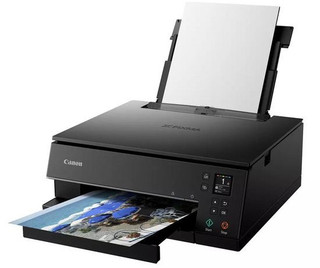
Alright, let me tell you why I love the Canon Pixma TS6350A. This printer is ultra-reliable and was created with versatility in mind - it will be your best friend for both photos and normal document printing.
What really makes it stand out is its 5-ink system comprising of the PGI-580 and CLI-581 cartridges. It’s got that extra pigment black ink to keep your text crisp and sharp, while the dye-based colours make sure your photos stand out with vibrant hues. And while some printers bleed you dry with ink costs, the TS6350A is more cost-efficient than most. You only replace the colours you need, which keeps things cheaper in the long run, even more so if you consider using the recycled Canon ink cartridges instead of the more expensive original inks.
Pros
- 5-ink system means stunning photo prints and sharp documents.
- Easy setup with wireless connectivity. Whether it’s from your phone, laptop, or camera, printing is a breeze.
- Compact design, so it fits neatly on a desk without taking over your whole workspace
- Reasonable running costs. Thanks to the separate ink cartridges, you’re not wasting money replacing colours that aren’t empty.
Cons
- No A3 printing. If you’re after large-format prints, you’ll need to look elsewhere.
- Paper capacity is a bit limited, so if you’re planning to print in bulk, you might find yourself refilling the tray more than you’d like.
- It’s not the fastest printer out there. If you’re always in a hurry, it might feel a bit slow for high-volume jobs.
Specification overview
Functions: Print, scan, copy
Ink System: 5 individual Canon inks (pigment black + dye-based colours)
Print Speed: Approx. 15 pages per minute (black), 10 pages per minute (colour)
Max Print Resolution: 4800 x 1200 dpi
Connectivity: Wi-Fi, Bluetooth, USB
Paper Handling: 100-sheet input tray, supports up to A4 size
Duplex Printing: Yes (automatic)
Why I picked it
I’ve used the Canon TS6350A for a while now, and I’ve got to say, it hits that sweet spot between high-end photo quality and everyday practicality. Setting it up was a breeze—I didn’t even need to mess with USB cables because the Wi-Fi worked straight out of the box. I’ve printed everything from holiday photos to work docs, and it handles both like a champ.
The print quality is seriously impressive for something in this price range. I’m not a professional photographer, but my photos come out looking rich and vibrant—exactly how I want them. And when it comes to documents, that extra pigment black ink really makes a difference, keeping everything super sharp.
One of my favourite things is the ink system. You’re not stuck replacing an entire cartridge just because one colour runs out. It’s way more efficient (and less frustrating). Plus, the duplex printing is a bonus—I love not having to manually flip pages for double-sided prints.
Sure, it’s not the fastest printer in the world, but for home use or personal projects, it gets the job done without fuss. If you want a reliable printer that’s versatile enough for photos and work, the Canon Pixma TS6350A is a solid pick.
Canon Pixma TS3355
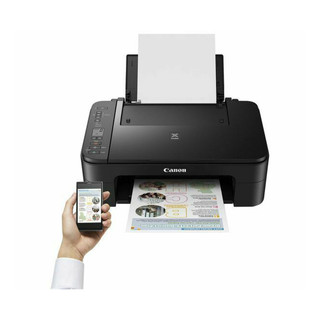
The Canon Pixma TS3355 is your go-to if you’re looking for a budget-friendly, all-in-one printer that gets the job done. It’s not a dedicated photo printer by any means, but if you’re someone who needs a reliable printer for everyday tasks like printing documents, scanning, and copying, it’s a solid choice.
It’ll handle casual photo prints just fine, but don’t expect gallery-level quality—this isn’t the printer for professional photography. That said, for the price, it’s a great value if you want a multifunctional printer for home use.
People love the TS3355 for being easy to use and affordable. Its super simple to set up (you can literally get it going in minutes), and the Wi-Fi connectivity is a breeze for printing directly from your phone or laptop.
Unlike the Canon Pixma TS6350A, the TS3355 doesn’t support duplex printing, which is something to keep in mind for document printing.
Pros
- Affordable. This is one of the cheapest options for an all-in-one that doesn’t feel like it’s cutting too many corners.
- Wireless printing. You can easily print from your phone or tablet via Wi-Fi or Canon’s mobile app, which is super convenient.
- Compact design. Small and lightweight, it fits neatly on most desks without taking up too much space.
Cons
- Not a dedicated photo printer. While it can print photos, they won’t match the quality you’d get from a more specialised photo printer.
- Basic ink system. It uses only two cartridges (black and colour), which can get costly over time since you have to replace the whole colour cartridge even if only one colour runs out.
- No duplex printing. You’ll have to manually flip pages if you want to print double-sided, which can be a bit annoying if you do it frequently.
Specification overview
Functions: Print, scan, copy
Ink System: 2 cartridges (black, colour)
Print Speed: Approx. 7.7 pages per minute (black), 4 pages per minute (colour)
Max Print Resolution: 4800 x 1200 dpi
Connectivity: Wi-Fi, USB
Paper Handling: 60-sheet input tray, supports up to A4 size
Auto Duplex Printing: No
Why I picked it
I prefer the TS3355 for every day when I just need something quick and easy. It’s not the most technologically advanced printer I’ve owned, but for the price, it punches well above its weight.
While I wouldn’t use it for super high-quality photo printing, I’ve printed a few holiday snaps and they came out looking pretty good—especially considering this isn’t a dedicated photo printer. If you just need something simple to print documents, kids' homework, or the occasional photo, the TS3355 is a great all-rounder.
The Canon PG-545 CL-546 ink costs can add up since you’re replacing a whole colour cartridge, but if you’re not printing constantly, it’s not a deal breaker. Plus, the wireless printing feature is a positive step in the opposite direction. Overall, if you’re after an affordable, reliable printer for general home use with a bit of photo printing on the side, this is one of the best options out there.
Canon Pixma Pro 200 A3+ Printer
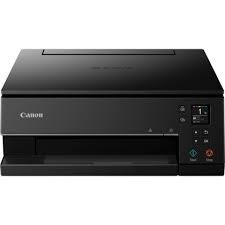
The Canon Pixma Pro 200 is a powerhouse for anyone serious about high-quality photo printing. This is an A3+ photo printer, which means it can print larger, professional-level prints up to 13x19 inches—perfect if you’re into photography, art, or any creative work.
It was built specifically for photographers who want to take their printing game to the next level without jumping into ultra-expensive professional machines. While the Pixma TS6350A uses just 5 inks, the PRO-200 features 8 dye-based inks. And you can really notice the difference!
In terms of value for price, it’s a solid investment, especially if you’re a casual or hobby photographer. While it’s definitely not the cheapest printer on the market, the level of print quality it delivers at this price point is hard to beat. It’s a great middle ground if you’re looking for professional-level output at home without spending thousands.
Pros
- Amazing print quality. The 8-colour dye Canon CLI-65 ink cartridges ensures rich, vibrant colours and excellent tonal range, especially for prints that need to pop.
- Large print sizes. Supports up to A3+ (13x19 inches), so you can create gallery-worthy prints at home.
- Relatively compact for an A3+ printer. It’s not huge so it fits nicely in most home offices or studios.
- User-friendly software. Comes with Canon’s Professional Print & Layout software, which makes managing colours and layouts super easy.
Cons
- Cost per print can add up. The 8-colour Canon ink system gives beautiful results but can be pricey to maintain, especially if you print often.
- No roll paper support. If you want to print panoramic images or longer prints, you’ll need a different setup.
- Only one paper feed tray, so you’ll need to swap between photo and standard paper manually if you’re doing both.
Specification overview
Functions: Print only (focused on photo printing)
Ink System: 8-colour dye-based ChromaLife100+ Canon inks
Max Print Size: A3+ (13x19 inches)
Print Resolution: 4800 x 2400 dpi
Connectivity: Wi-Fi, USB, Ethernet
Paper Handling: Up to A3+ paper, with manual duplexing
Why I picked it
I picked the Canon PIXMA PRO-200 as the best option for semi-professional photo printing. I’ve used it to print large photos and art pieces, and every time I’m blown away by how vibrant and sharp the colours are. The 8-ink system really makes a difference when you’re printing detailed images or anything with a lot of colour variation.
Another thing I love is the ease of use. Even though it’s a high-end photo printer, it’s surprisingly user-friendly. Canon’s software makes it super easy to manage colour settings, which is crucial when you’re trying to get your prints to match the screen. I’m not one for complicated setups, and this printer was pretty straightforward—just install the drivers, load the paper, and you’re off.
One thing I will say is that the ink costs can add up, but that’s to be expected with a printer of this calibre. For me, the trade-off is worth it because the quality is that good.
If you’re looking to print large, high-quality photos at home without completely emptying your bank account, the Canon Pixma Pro 200 is definitely one of the best options out there. Just be ready to invest a bit more into ink if you’re planning on using it regularly.
Canon Pixma G550 MegaTank
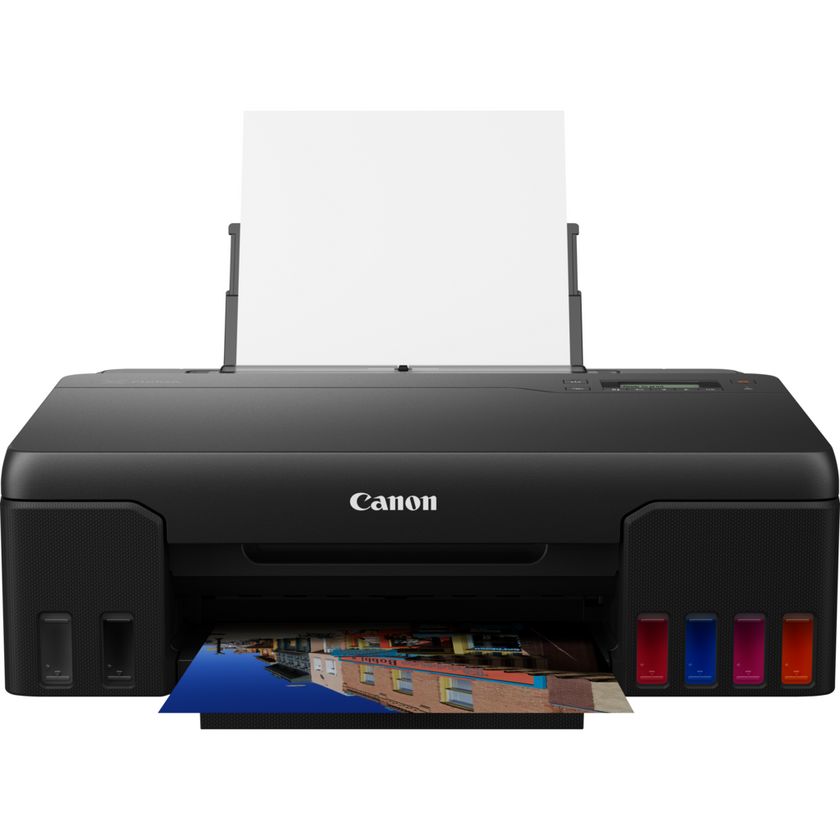
The Canon Pixma G550 ink tank printer is an A4 colour inkjet printer that’s part of Canon's MegaTank line-up. If you’re unfamiliar with MegaTank, it’s essentially Canon’s answer to the headache of running out of ink every 5 minutes.
You get these refillable Canon ink tanks that last forever—okay, not literally, but pretty close. This makes it not only cost-effective but super reliable for high-volume printing, especially if you’re someone who prints a ton of photos.
At first glance, the Canon Pixma G550 might seem like an investment—it's not your average budget printer. But if you think about it in terms of long-term use and ink savings, it’s an absolute bargain.
Most printers of this quality would have you constantly buying new cartridges, but the refillable tank system makes running costs super low. I’m talking about printing hundreds of photos before even needing to think about refilling. For me, that alone makes it worth every penny.
Pros
- Incredible photo quality: The six-colour dye-based Canon GI-53 ink bottle system is a game-changer for vivid and true-to-life colours.
- Super low running costs: The MegaTank system saves you tons in ink.
- Great with a range of paper types: Whether it’s glossy, matte, or fine art paper, it performs flawlessly.
- Durability: Built to last, with solid design and reliable performance over time.
Cons
- No scanner or copier: This is purely a printer, so if you're looking for an all-in-one device, this isn’t it.
- Initial price tag: It’s more expensive upfront compared to standard inkjet printers.
- Not the fastest: It’s definitely geared towards photo quality over speed, so if you’re in a rush, it might feel a bit slow.
Specification overview
Print Resolution: Up to 4800 x 1200 dpi
Ink System: 6 dye-based Canon ink bottles (including red and grey for enhanced colour precision)
Max Paper Size: A4
Ink Tanks: Refillable (MegaTank)
Connectivity: USB, Wi-Fi, and Canon PRINT app for wireless control
Print Speed (Photo): Around 47 seconds for a borderless 4x6 print
Why I picked it
The Canon Pixma G550 is a great middle ground between your everyday home printer and a more semi-professional setup.
The G550 offers way better photo quality than a standard home printer like the TS6350A but without the huge price tag (or footprint) of the Pro 200. You’re still getting incredible colour depth, thanks to that six-colour ink system, but you don’t have to shell out for a professional setup.
Another reason I chose the G550 is its eco-friendliness. The MegaTank refillable ink system means you're cutting down on plastic waste from constantly replacing cartridges. I love that I can refill the ink tanks myself without all the waste that comes with single-use cartridges—it feels like I’m doing my part to be a bit more eco-conscious while still getting killer print quality.
Plus, the refills last so long that you’re not running out every few weeks, which is a massive bonus for both the environment and your wallet.
So, for me, the Canon Pixma G550 hits that sweet spot, great for photo enthusiasts who want quality prints at home, but also sustainable and cost-effective in the long run.
Final Thoughts
So, if you’re ready to start your next photo printing project, it all comes down to what you value most. For a versatile at home printer with photo capabilities, the Canon Pixma TS6350A and TS3355 could be for you. If you’re looking for something a bit more specialised, the Canon Pixma Pro 200 or Pixma G550 are both great options.
I’ve tested these models thoroughly, and I can honestly say Canon does a great job with photo printers so you really can’t go wrong. Have a think about the frequency and quantity of the jobs you want to get done, and go from there!
Blog Author: Simon Cross is the engaging and knowledgeable voice behind the insightful articles on printers and printer consumables at IJT Direct, an ecommerce store renowned for its comprehensive selection of printers, printer consumables, and hardware. View Simons author pageto find out more about him.
Browse Our Top Ink Cartridges